Telephones
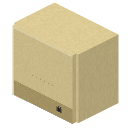
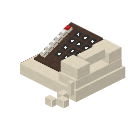
#A Telephone needs a Phone PABX: put it touching one, or on its data wire. The PABX gives it an extension, shown on its screen. Place it on top of a block for a desk phone, or against the side of one to hang it on the wall.
Key a number and press CALL; the far phone rings for 30 seconds.
Who you can call
- A phone on the same PABX: its extension, like 101.
- A phone on another PABX across a microwave link: that PABX's master number, then the extension: 602101.
- A phone on a PABX behind yours: that PABX's number, then the extension.
A phone's screen shows its full number from across the link.
Talking
Sneak and right click with an empty hand to pick up the handset: it answers a ringing phone, and only you are heard, with the far end at your ear. The cord reaches 5 blocks. Sneak and right click with the handset to hang up.
Left on its cradle the phone is a speakerphone: CALL answers, anyone close by is heard, HANG ends it.
Voice chat
Calls carry your voice through Simple Voice Chat. If its microphone is set to push to talk, hold its talk key while you speak on the phone. With voice activation (open mic) the phone just hears you.
Open mic never keys a radio: radios still only transmit while their own PTT is held. Players near you hear you through voice chat either way.
Extensions
The other end sounds clean and a little fuller than SSB. Interference or a weak microwave link makes it break up.
To change a phone's extension press EXT, key the new number and CALL. No two phones on one PABX may share one.
Telephone A
A C
C- A Microphone Element
- B Terracotta
- C Redstone